Website local MCP or the official CLI MCP?
Compare two local workflows: manage artwork files and edit in a browser, or use the official CLI with a headless engine or desktop application.
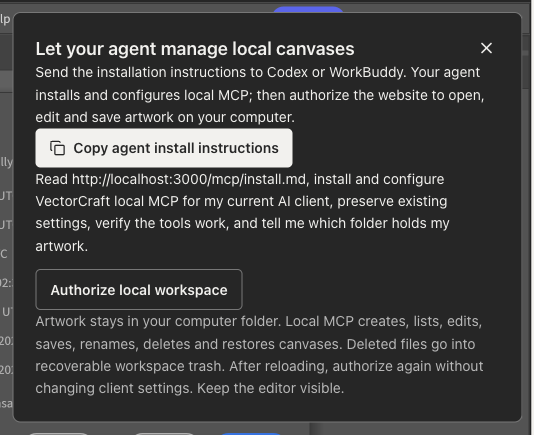
The website now uses local MCP: your agent manages native artwork files on your computer, while the browser provides visible editing and previews. Both this approach and the official CLI can run locally, but they serve different workflows.
The official option here means upstream ArtCraft VectorCraft v0.11.0 and its CLI MCP. VectorCraft Online is independently hosted and adds its own local file/browser connection layer to the upstream engine. It is not the official ArtCraft website.
Choose where the work happens
| Need | Website local MCP | Official CLI MCP |
|---|---|---|
| See changes in a web canvas | Edit in an explicitly authorized browser | Headless mode has no web UI |
| Manage artwork files | Create, list, read, save, rename, delete and restore from trash | Native engine and file workflows; consult its tool catalog |
| Draw or render without a browser | File management works offline; native drawing and previews need the visible browser |
|
| Control a desktop app | No desktop UI control |
|
| Website cloud relay | None for canvas commands or artwork | Local stdio; model/client networking depends on your setup |
Website workflow: agent installation and local files
Follow the connection guide. Send the canvas panel's installation instructions to Codex or WorkBuddy; your agent installs MCP, preserves existing settings and checks the tools. Then authorize the local workspace in the website. No manual MCP URL or pairing code is required, although client reload or browser permission may need your action.
Files default to ~/Documents/VectorCraft. Create, edit, save and rename independent artwork; deletion moves files into recoverable trash. Saves check revisions before overwriting a file changed by another program.
Native drawing still depends on a visible web editor. File creation does not require it, and edits need an explicit save to the local file. This suits collaborative editing where you watch and continue the work yourself.
Official CLI workflow: unattended processing and native tools
The official documentation describes vectorcraft-cli mcp --headless, using its native engine and CPU renderer. This is the more direct route for unattended jobs or drawing without opening a browser.
The CLI can also connect to a running desktop application. Read its MCP documentation and control protocol for read/write root confinement and its complete tool set. The website's focused tools do not replace the entire official MCP.
Your AI client still determines model data handling
Local transport avoids sending artwork through our website server, but your AI client may share object data, previews or exports with its model provider. Review its settings for confidential work.
We validated local file lifecycle, actual browser edits and saving to disk. That does not establish a success rate for complex artwork. Start with a test canvas, make a small edit, save and reopen it before moving on to important work.